
If there is another administrator account that you can log into, then jump to step 7 after logging into that account.
However, if you can't get to any accounts at all, then start at step 1.
1. Restart your computer and hit F8 multiples times until you see a menu-like screen, if you see the Windows splash screen then repeat this step.
2. Highlight and hit enter on Safe Mode with Command Prompt. Try logging in there. If it still doesn't work, then go to step17.
3. If you are able to login, once a command prompt pops up, type: net user administrator password /active:yes (you can specify whatever password you want for the administrator account.)
4. If you get a message saying "The command completed successfully", then restart your computer by typing: shutdown -r.
5. Boot up again pressing F8, but this time choose just Safe Mode.
6. You will be able to login as Administrator with the password you set in Step 3.
7. Hit (windows logo)+R.
8. Type regedit.
9. Once the registry editor opens up, look for HKEY_LOCAL_MACHINE\SOFTWARE\Microsoft\Windows NT\CurrentVersion\ProfileList 
10. In the left pane, find the one that starts with S-1-5..... and ends with .BAK; if you don't find one, skip to step 15.
11. Right click it and click Rename, then change the .BAK to .BK
12. Right click the one with the same numbering but without the .BAK and add .BAK add the end.
13. Right click the one that you renamed to .BK and clickRename, delete the .BK
14. Eventually, you have switched the .BAK from the end of the second entry to the first. That should probably fix your problem.
15. If you didn't find a .BAK then try this: Open Windows Explorer to C:\Users\Default\AppData\Local\Application Data
16. If you find another Application Data below the one you're on, then delete it. That should probably also fix your problem.
17. If you can't login in Safe Mode, then reboot and hit F8 until you see the menu again, then hit enter highlighting Repair Your Computer.
18. Wait until all Windows Files finish loading, then hitNext when it asks keyboard language.
19. Try logging in here also, choose your user from the dropdown menu, and type the password, then jump to step 23.
20. If that still doesn't work, then if you have your Windows Installation CD still, put it in and restart your computer.
21. Hit F12 until you see a menu of boot options, choose Boot from CD.
22. Choose keyboard language then hit next. Find Repair Your Computer from a little below the center left.
23. Choose Open Command Prompt and type: net user administrator password /active:yes (here again you can specify a password)
24. Close the command prompt and click Restart and jump to step 5.
**To disable the administrator account, type this in an elevated command prompt: net user administrator /active:no

When you log on to a non-genuine copy of Windows XP, the following notification error message "This copy of Windows is not genuine" will pop-up on the logon process. And the nicely said "You may be victim of software counterfeiting" message on the bottom right corner of log-in screen.
 Microsoft allows WIndows faithfuls to have 2 options: Get Genuine or Resolve Later. Click on Resolve Later will temporarily bypass the notification and let you login into and use Windows nagged with notification icon and messages, which will randomly appear as balloon notification message with an icon in the notification area (system tray).
 Clicking on the balloon notification or the notification area icon will lead you to the Windows Genuine Advantage Validation Failure Web page that contains the specifics of the validation failure and the steps that you can take to make the operating system genuine.
First Method
Second Method
Norton AntiVirus Clients or Symantec AntiVirus Clients especially Corporate Edition Clients can be installed as managed network setup type by a Symantec Antivirus Server. When a Symantec AntiVirus Client managed, it will prompt for password when uninstalling client via local computer Control Panel Add or Remove Program applet. If you don't know or forget the password, then the client is not able to uninstall or remove. And the SAV client uninstall password won't work with server group password too, as if you enter that password, you will receive an invalid password message.
The client uninstallation password is different from the server group password, and it can be set by the administrator through the Symantec System Center for the client that is managed. If the client uninstallation password has not been set or change specifically, it will still be the default password. Thus, first thing to try in order to successfully uninstall a Symantec Client Security program is by using the default password for the uninstalling client, which is symantec.
In the cases where Symantec AntiVirus server has been taken down and no longer exist, or the client computer has no access to company network, or the default client uninstall password does not work, the folllowing hack will enable you to remove Symantec AntiVirus without using a password:
1. Open Registry Editor (regedit)
2. Navigate to following registry key:
HKEY_LOCAL_MACHINE\SOFTWARE\INTEL\LANDesk\VirusProtect6
\CurrentVersion\Administrator Only\Security\
3. Change the value for useVPuninstallpassword key from 1 to 0.
4. Exit Registry Editor and now you can uninstall Symantec Antivirus Client.
The trick should work on most version of Symantec AntiVirus client or Norton AntiVirus client, including version 7, 8 9 or 10.
Steps to remove Symantec Endpoint Protection 11 WITHOUT knowing the uninstall password:
- Click on Start -> Run (or Window Key + R if you don't have the Run menu item)
- Type smc -stop. If it prompts for a password, open regedit (Window Key + R; type regedit; hit ENTER) and then navigate to HKEY_LOCAL_MACHINE\SOFTWARE\Symantec\Symantec Endpoint Protection\SMC. Look for the smcexit key, delete it, and then type smc -stop in the Run box again. Note: my key was called smcexit-test or something like that, but deleting it had the same effect.
- Now, navigate to HKEY_LOCAL_MACHINE\SOFTWARE\Symantec\Symantec Endpoint Protection\SMC. Look for the smcinstdata key; delete it.
- You should now be able to use Add/Remove programs (or Programs & Features in Vista & 7) to remove SEP 11 without supplying the uninstall password.
- You're now free from the shackles of Symantec. Enjoy a 10-15% performance boost.


You use Internet Explorer and often save websites you like as bookmarks or favorites. Internet Explorer usually saves them to default folder "C:\Documents and Settings\Owner\Favorites" but you would prefer a specific location of your choice. Internet Explorer does not offer the option to change the default location for favorites.
The path to the Favorites folder is stored by Internet Explorer in the Windows registry, where you can edit it. It is best to first close your browser and copy the Favorites folder to the new location you want to use. Now, click on 'Start - Run', type 'regedit' and press [Enter]. In the registry editor, open the key
'HKEY_CURRENT_USER\Software\Microsoft\
Windows\CurrentVersion\Explorer\ShellFolders\'.
'HKEY_CURRENT_USER\Software\Microsoft\ Windows\CurrentVersion\Explorer\User ShellFolders\'.
In the right pane of the window, double click on 'Favorites' and in the dialog box, enter the new path to the bookmark. Close it with 'OK'. Then do the same thing with the key 'HKEY_CURRENT_USER\Software\Microsoft\Windows\CurrentVersion\Explorer\ShellFolders\'. After restarting, Internet Explorer will pick up your folder structure from the new location now save all the bookmarks you create there.
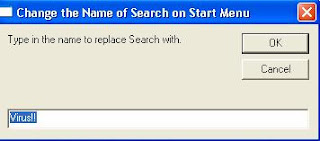
Need to Rename your Search, YES! Now you can rename the run as you like.....
Just copy all the below text into the Notepad file:
n = ws.RegRead(p1 & "LocalizedString")


Need to Rename your Run, YES! Now you can rename the run as you like.....
 After that double click the file your will see this screen:
 Type the name as your want!! This example is rename the run as "Don't Click"!
After success:
 Wish You all can enjoy it.....^^
This is enable, if wan disable " Change value of "CheckedValue" to "0" "
HKEY_LOCAL_MACHINE\SOFTWARE\Microsoft\Windows\CurrentVersion\Explorer\Advanced\Folder\Hidden\SHOWALL
Change value of "CheckedValue" to "1"
**If you cannot find that do a search (Ctrl + F) and put "SHOWALL" text. I am sure you will find it this time.


